I want to be upfront about something before we get into this. I am not a developer. I have never shipped an app. I don’t really know Swift. A week ago I couldn’t have told you what Xcode was with any confidence.
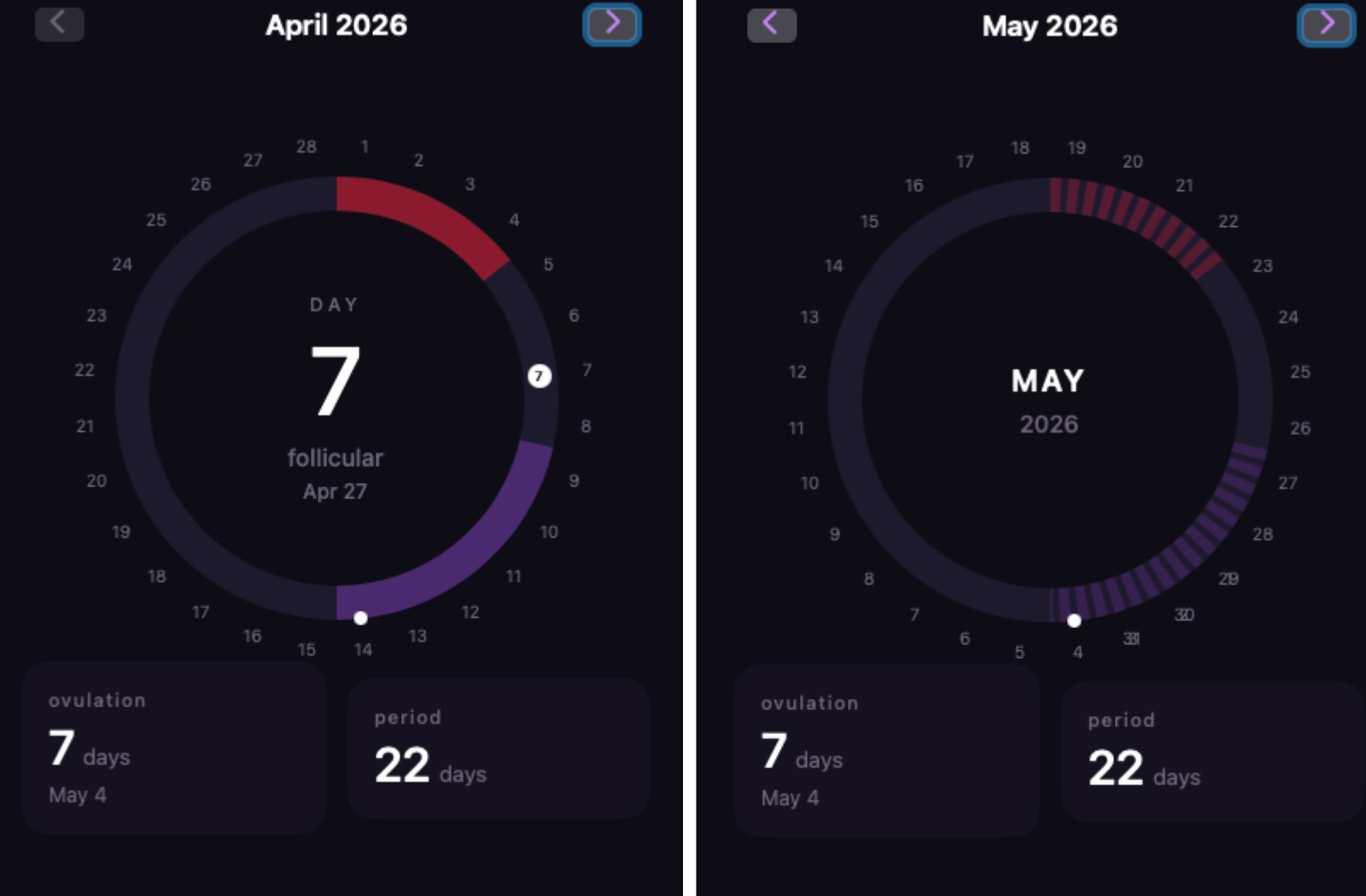
And yet, somehow, I now have a functioning iOS period tracking app running in a simulator on my Mac, with a dark minimal UI, a cycle ring that tracks ovulation windows, a history tab, calendar navigation, and logic that actually reflects how the menstrual cycle works biologically.
This is the story of how that happened, what broke along the way, and what I actually learned.
Why I wanted to build this
I use period tracking apps. Most of them are fine. But they’re also bloated, ad-riddled, and frankly a bit patronising in their design—pastel colours, cutesy flower icons, upsell prompts every time you open them. I wanted something simple. Dark, minimal, no fluff, no account required, no data going anywhere except my own phone.
I also wanted to understand what I was actually tracking. I’d been using these apps for years without fully understanding why the fertile window sits where it does, or what the luteal phase actually means. Building the app became a way of forcing myself to actually understand the biology.
The Setup: Xcode, Cursor, and Claude
The first hurdle was the tooling. Building an iOS app means using Xcode, which is Apple’s development environment, and which is—let’s be honest—not exactly designed to be welcoming to newcomers. It’s enormous, the interface is dense, and the first time you open it you’re confronted with what feels like the cockpit of a plane.
I got it set up, created a new SwiftUI project, and then immediately started using Cursor (an AI-powered code editor) to actually write the thing. The workflow at this stage was essentially: describe what I wanted in plain English, have Cursor generate the Swift code, paste it into Xcode, see what broke, repeat.
This works better than you might expect. It also breaks in ways you don’t anticipate. The main issue early on was that I didn’t understand the code well enough to know why something wasn’t working, which meant I couldn’t give the AI good enough instructions to fix it. You end up in loops where the AI fixes one thing and introduces another problem, and if you don’t understand the underlying logic you can’t interrupt that loop effectively.
The lesson I took from this early stage: you need to understand the domain logic even if you don’t understand the code. For a period tracker, that means understanding how cycles actually work.
The biology detour that made everything better
Before I could write good prompts, I needed to genuinely understand what the app should be calculating. I spent time with Claude working through the biology, not vaguely, but specifically, in the kind of detail that would let a coding agent implement it correctly.
The thing that surprised me most was this: ovulation doesn’t happen 14 days after your period. It happens 14 days before your next period. The distinction matters enormously for the logic. The luteal phase (the time between ovulation and your next period) is almost always a fixed 14 days. The follicular phase (the time between your period and ovulation) is what varies between people and between cycles.
This means a shorter cycle doesn’t compress the whole thing evenly. It compresses the follicular phase. A 25-day cycle has ovulation on day 11. A 32-day cycle has ovulation on day 18. The fertile window, which is always six days, the five days before ovulation plus ovulation day itself, just shifts earlier or later. It doesn’t get longer or shorter.
Once I understood this properly, I could write prompts that were actually precise. Not “add a fertility tracker” but a full specification of which day numbers map to which phases, what the ring arcs should represent, how the color coding should work, and what edge cases to handle. The quality of what the AI produced got significantly better as soon as I could describe exactly what I wanted.
The stack: What I actually ended up using
By the time the app had its core structure, I’d settled into a clear setup:
SwiftUI for the interface: Apple’s modern framework for building iOS and Mac apps. SwiftData for storing cycle history entirely on-device. No backend, no account, no data leaving the phone. GitHub connected via SSH for version control, so I had a safety net when things went wrong (and they did). Cursor for the earlier vibe-coding phase where I was exploring and iterating quickly. Claude Code as the project got more structured and the prompts became more detailed.
The shift from Cursor to Claude Code felt meaningful. Cursor is fast and good for exploration. Claude Code felt better suited to the point where I had a clear vision and needed precise execution, where I could write a detailed specification and have it implemented consistently across multiple files.
Building the ring
The centrepiece of the app is a circular ring that represents your cycle. Day numbers sit around the outside. Two arcs sit on the ring: a red one for the period, a purple one for the fertile window. The current day is marked. The centre shows what cycle day you’re on, what phase you’re in, and the calendar date.
Getting this right was probably the most technically interesting part of the build. The early version had cycle day numbers (1, 2, 3…) around the ring, which seemed logical until I realised it was confusing, the numbers looked like dates but weren’t. The ring needed to show actual calendar dates, with the cycle day count living in the centre where it already was.
There was also a discrepancy I noticed when comparing my app against a period tracker I already use. Same settings, same period start date, different predicted ovulation dates: mine showed May 4, the other showed around May 7. The difference came down to a single design decision: whether “ovulation day” means the earliest likely ovulation (the clinical formula, cycle length minus 14) or the most probable peak day (which real-world data suggests falls a day or two later). Neither is wrong. They’re different assumptions. But the app needs to be consistent about which one it’s using.
These are the kinds of decisions that don’t feel like “coding” but are actually the most important part of building something that people will trust with their health data.
The prompting approach
Something I developed throughout this process was a way of writing prompts specifically for a coding agent building this kind of app. Not code snippets, plain English specifications that could be pasted directly into a new session without needing the conversation history.
The key things that made prompts work better:
- Specificity about what doesn’t change. The fertile window is always 6 days. The luteal phase is always approximately 14 days. The colour red is used only for bleeding. These constraints need to be stated explicitly or the AI will make its own decisions that quietly drift from what you built before.
- Stating the formula, not just the outcome. Don’t say “show the ovulation window.” Say “ovulation day equals cycle length minus 14, the fertile window starts five days before that, the window is always six days regardless of cycle length.”
- Including the why. When I explained that the luteal phase being fixed is the reason the formula works, the AI was better at catching edge cases than when I just gave it the formula without context.
- Describing the current state before the change. Every prompt that modified the UI started with a description of what currently existed, so the agent knew what to preserve. This prevented it from redesigning things that were already right.
What’s still broken (and what’s next)
The app works. It also has rough edges.
Calendar navigation—browsing back to past cycles and forward to predicted future ones—is the most recent feature and the most complex. Getting the ring arcs to align correctly with actual calendar dates when a cycle spans two months (which is most of the time) is a fiddly geometry problem that’s still being refined.
The app runs in the Xcode simulator. It hasn’t yet been on a physical iPhone. That’s the next milestone. After that: local push notifications so it can tell you your period is arriving in three days, which requires an Apple Developer account.
Eventually, maybe TestFlight for sharing with a small group. Maybe not. The honest answer is that the primary value of this project was never really the app: it was the process of building it, and what I learned along the way about how to work with AI tools, how to think about domain logic, and what “vibe coding” actually means in practice.
What vibe coding actually means
This phrase gets used a lot right now and I think it means different things to different people. For me, it turned out not to mean “tell the AI what you want and watch it appear.” It meant something more like: develop a clear enough understanding of what you’re building that you can describe it precisely, then use AI to handle the parts that are about syntax and structure rather than about thinking.
The thinking is still yours. The domain knowledge is still yours. The decisions about what the app should do, how it should behave, what trade-offs to make—those don’t get outsourced. What changes is that the gap between having an idea and having something on screen gets dramatically smaller, which means you can iterate, test, and learn faster than would otherwise be possible.
For someone who isn’t a developer, that’s genuinely significant. This app would not exist without AI tooling. But it also wouldn’t exist without me spending real time understanding how the menstrual cycle works, thinking carefully about what the UI should communicate, and writing detailed specifications rather than vague prompts.
That combination—human domain understanding plus AI execution capability—is the actual thing. And it’s more interesting than either part on its own.
This is part of my Learning Journey series. I write about building things, figuring things out, and what it's actually like to learn in public. More at laurenmae.co/
Check out what other projects I’m working on: