A week ago I couldn’t have told you what a “skill” was in Claude. I’d heard Cowork mentioned, hadn’t touched it. I definitely didn’t know you could build reusable tools that just sit there, waiting, and work every time.
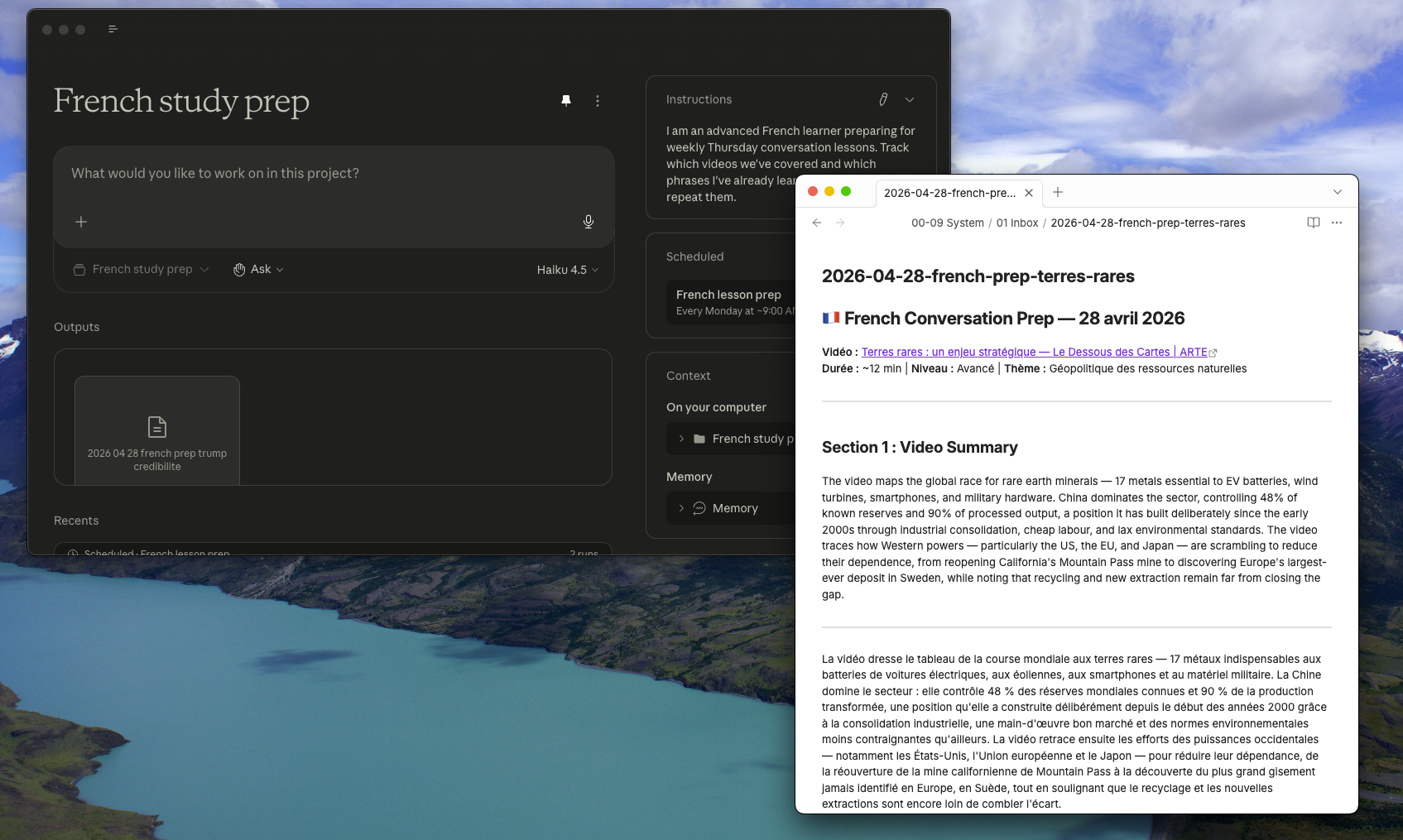
Now I have a French conversation prep system that finds YouTube videos, extracts transcripts, pulls key phrases, and generates bilingual study materials I actually use in my Thursday lessons. It runs every Monday morning. I pick a video, confirm my choice, and by Tuesday there’s a document in a folder on my desktop.
This is how that happened, what broke, and why it took about an hour.
Why I wanted to build this
I have a French conversation lesson every Thursday. I’m advanced enough that grammar drills aren’t the bottleneck—I need to sound French. That means pulling out du coup and en fait naturally, remembering to use y and en, reaching for phrases that mark you as someone who actually consumes the language rather than someone who studied it.
The problem was I never practiced during the week. I’d watch French YouTube sometimes but wasn’t extracting anything systematic. I’d show up Thursday and realize I’d forgotten everything I’d meant to drill.
I wanted something that would find me a video on topics I care about—tech, finance, current affairs—pull 8-10 phrases worth memorising, generate conversation scenarios my tutor might actually raise, and do all of this automatically so I’d keep using it.
The key word there is automatically. The difference between a tool I use and one I forget about by week three is whether I have to remember to start it.
The setup: chat first, then build
I started in a regular Claude chat. Not Cowork. Just conversation. I explained what I wanted and we iterated on the prompt—what should the output look like, bilingual or English-only, how many phrases, what kind of scenarios.
This was necessary. “Help me learn French from videos” doesn’t give you anything actionable. But “find 5 videos under 13 minutes on tech or current affairs, let me pick one, then extract 8-10 natural phrases with usage notes and memory hooks”—that’s a specification.
When the prompt felt right I moved it into Cowork. First result was good but not perfect. The summary was English-only when I wanted it bilingual. Conversation scenarios felt a bit robotic. Phrases were there but examples weren’t always drawn from the actual transcript.
So I refined. If you can’t access the transcript, don’t make it up—ask me to provide it. Conversation answers should sound like me talking to my tutor, not a grammar textbook. Bold the phrases when they appear in sample answers so I can see them in use.
By the third iteration the output was genuinely useful. I had a dated markdown file I could study Wednesday night and use Thursday morning. That’s when I realised this shouldn’t be something I paste in every week. It should be a skill.
What a skill actually is
A skill in Claude is a saved instruction set that lives in Claude Desktop and triggers when you need it. You write it once as a markdown file with a header that tells Claude when to invoke it. Drop it in the right folder, or upload it through Desktop’s Skills settings, and Claude just knows it exists.
The practical difference: instead of pasting a 500-word prompt every Monday, I type four words. Prep my French lesson. Claude knows what that means, knows my interests, knows the format I want.
The workflow I ended up with
Monday morning (automated) A scheduled task runs. Claude searches for 5 recent French-language YouTube videos—8 to 13 minutes, tech, current affairs, finance, or something worth discussing. It presents them with titles, channels, durations, and links. Then it stops and waits.
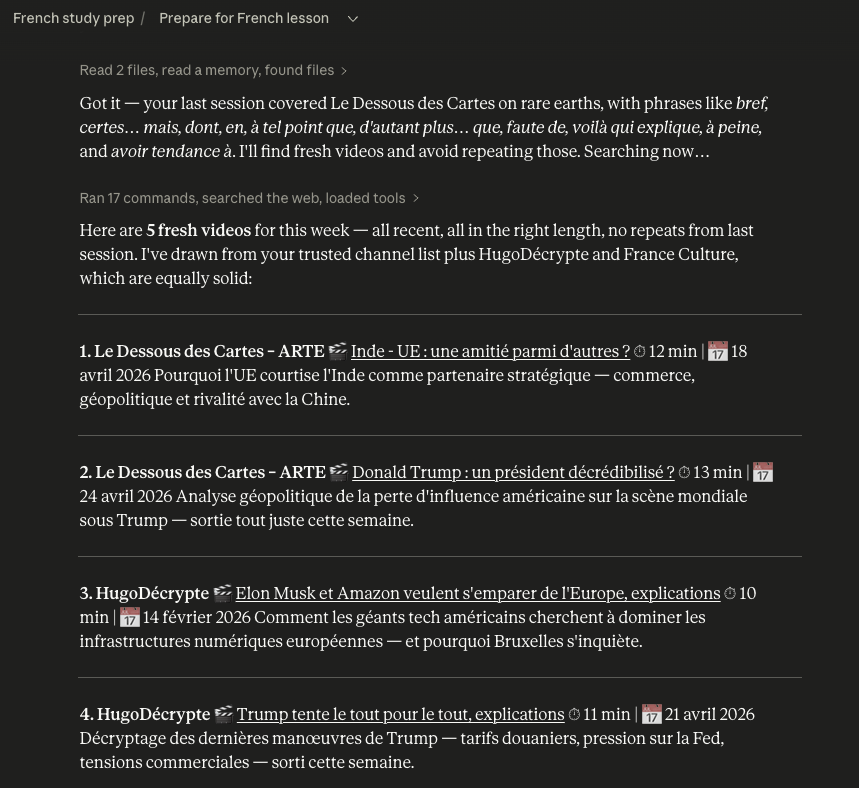
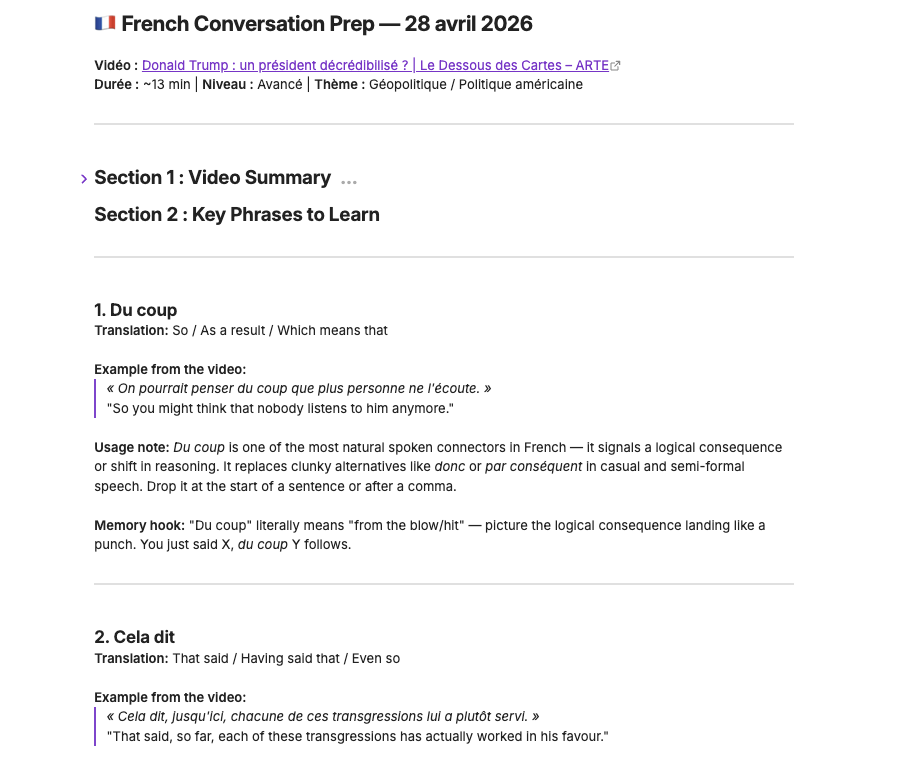
Monday or Tuesday I pick one. Usually just I’ll go with #3. Claude extracts the transcript, generates parallel summaries in English and French (not a translation—separate summaries in each language), pulls 8-10 key phrases with usage notes and memory hooks, and creates 3 conversation scenarios with sample answers that use those phrases naturally. Output saves as a dated markdown file into my French study prep folder.
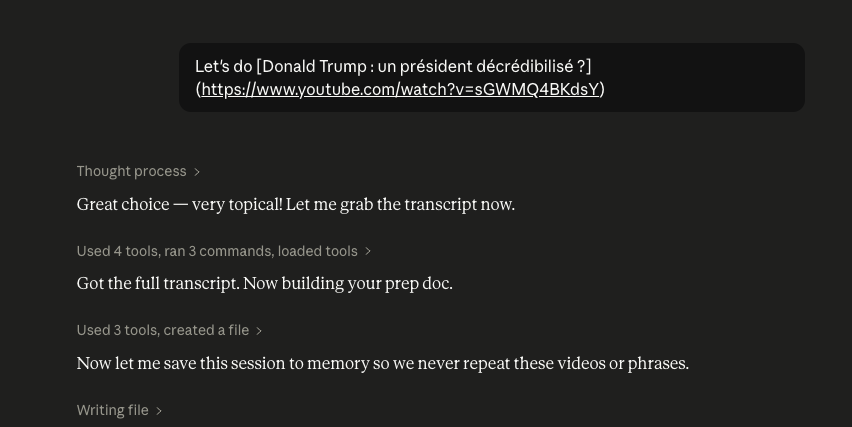
Wednesday night I open it. Thirty minutes, maybe less.
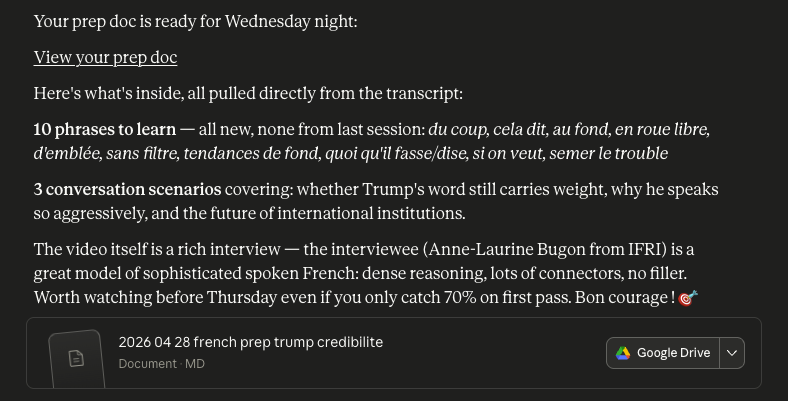
Thursday morning I use it.
What broke along the way
The first version assumed I’d supply a YouTube URL myself. But finding the video was the whole problem I was trying to solve. So I added a discovery stage.
The second version asked me to specify my interests every single week. Tedious. I baked my interests directly into the skill as a Learner Profile section. Now it just knows.
The third version omitted YouTube links from the video results. It would present five options—title, channel, duration, one-line description—but no URL. Annoying, because the first test run had included links and I assumed that was standard. It wasn’t. I added an explicit instruction: Always include the full YouTube URL for each video. This is required, never omit it. Small thing. The kind of small thing that makes a tool feel broken when it’s missing.
The fourth version wasted time searching for “best French YouTube channels” before it started looking for videos. I’d included a list of trusted channels—Heu?reka, Le Dessous des Cartes, Underscore_—intending them as a starting point. But Claude was treating the absence of a definitive list as a reason to go find one first. Fixed by rewording: Start with these channels, but expand freely if nothing suitable comes up. Do not search for channel lists.
There was also a transcript question I’d expected to be a problem. I hadn’t set up any YouTube connectors or MCP servers. I assumed extraction would fail. But when I checked the output against the actual transcript, everything matched—specific phrases, statistics, sentence structures. Cowork has some built-in capability I hadn’t known existed. I verified it anyway rather than trusting it on faith, which felt like the right instinct.
Setting up the project
Once the skill was working I created a dedicated project in Claude Desktop called “French study prep” and connected a folder on my desktop with the same name. This is where the weekly markdown files save.
The project does something the standalone skill couldn’t: it gives Claude memory across sessions. It knows which videos I’ve already covered. Over time it’ll know which phrases I’ve drilled, which conversation topics my tutor gravitates toward. The prep documents get progressively more tailored rather than starting from scratch every week.
I added one project instruction: I am an advanced French learner preparing for weekly Thursday conversation lessons. Track which videos we’ve covered and which phrases I’ve already learned so we never repeat them.
Then I set up the scheduled task—weekly, every Monday morning. The whole thing kicks off without me having to remember to start it. I come back to five options waiting rather than having to initiate the process myself. That difference—friction removed versus friction reduced—is what determines whether I actually use something.
What made the prompting work
The quality of what Claude produces is almost entirely determined by how precisely you describe what you want. Vague prompts give you vague results.
A few things that made my prompts better:
- Specific constraints over general ones. “The video must be 8-13 minutes” beats “find a short video.” “Extract 8-10 phrases” beats “pull some key phrases.”
- Stating what doesn’t change. My interests are always tech, finance, current affairs. The output is always a dated markdown file. Phrases should always be bolded when they appear in sample answers. These become anchors—they prevent Claude from making decisions you didn’t ask it to make.
- Including the why. When I explained that I struggle to remember y and en in conversation even though I know what they mean, Claude started prioritising examples of those pronouns in context. The why shaped the output in ways a mechanical instruction wouldn’t have.
- Describing the workflow, not just the deliverable. Stage 1: find videos, wait for user to choose. Stage 2: generate prep doc. That two-stage structure is now baked in. Without it, Claude would try to do everything at once before I’d had a chance to pick.
- Being specific about what not to do. Do not search for channel lists. Do not make up content if you can’t access the transcript. Do not omit the YouTube link. Negative constraints turned out to be as important as positive ones.
Where it is now
The skill works. I’ve used it once for an actual lesson. The output was genuinely useful—I studied it Wednesday night and used three phrases Thursday morning, including voilà qui explique, which my tutor noticed. It’s a pretty sophisticated connector for a non-native speaker to pull out naturally mid-conversation.
Building the tool took an hour. The actual test is whether I use it every week for the next three months. The scheduled task removes the friction of starting. Monday morning the options just appear. But showing up to study them on Wednesday, using them Thursday—that part is still mine.
What “vibe building” actually means
This phrase is getting thrown around a lot right now, usually by people who either think it’s magic or think it’s fake. It’s neither.
For me it meant: knowing exactly what I needed, understanding the domain well enough to specify it precisely, and using AI to handle the structure, the formatting, the repetitive parts—the things about execution rather than thinking.
The thinking stays mine. What changes is that I don’t need to know how to code. I just need to know what I want clearly enough to describe it.
That’s the unlock. Not AI does everything for you but AI handles the parts that used to require technical skills you don’t have, so you can focus on the parts that require judgment and taste.
This tool wouldn’t exist without Claude and Cowork. It also wouldn’t exist without me spending time figuring out what I actually needed, catching the things that broke, and iterating until it was genuinely useful rather than just technically functional.
That combination is the actual thing.
This is part of my Learning Journey series. I write about building things and figuring things out.
Check out what other projects I’m working on: